Workshop touchscreen kiosk: real-time display of technicians’ jobs
A workshop touchscreen kiosk changes how technicians access their jobs: no more calling the office or asking a colleague, the information they need is displayed right there, updated in real time. Here is what it shows, how it differs from a tablet, and how to install it so it actually gets used.

The management software built for automotive aftersales.
Why equip the workshop with a touchscreen kiosk?
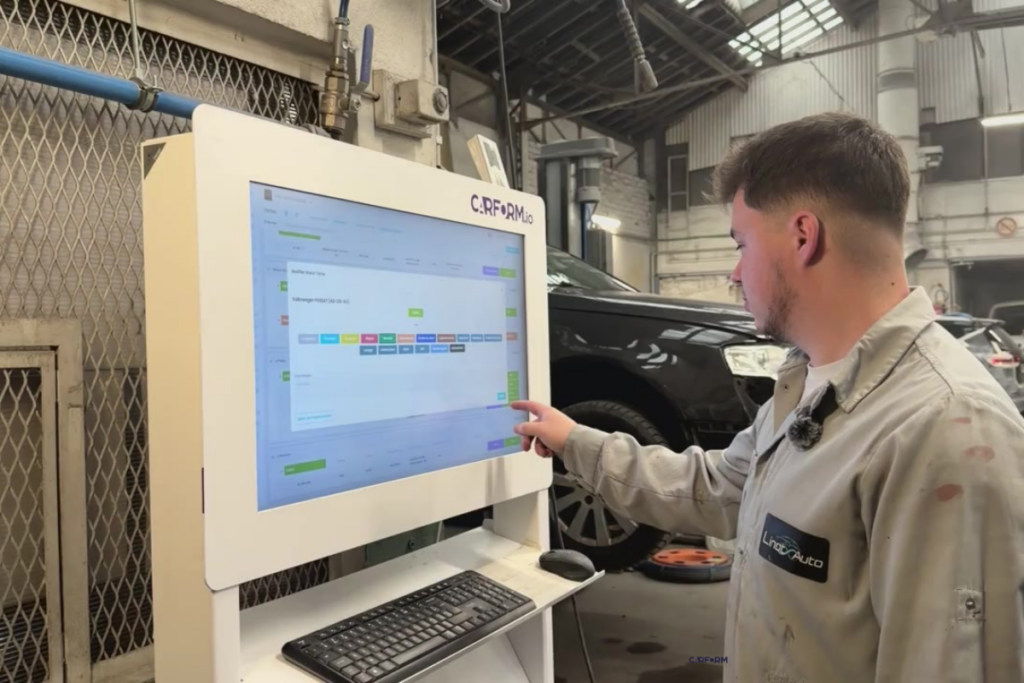
A workshop touchscreen kiosk is a large, fixed, shared touchscreen that displays the jobs prepared by the office in real time, and on which technicians update their progress. It replaces back-and-forth trips and verbal instructions with information everyone can see.
In a body shop, a mechanical workshop or a paint shop, each technician works on several vehicles at once, with priorities that change during the day. Without a dedicated screen, information travels by word of mouth: a trip to the office, a call to the workshop manager, a scribbled note. It works, but it interrupts the work and multiplies oversights.
What exactly the technician sees
Technicians do not see the whole workshop: they see their own work queue, prepared by the office. For each vehicle assigned to them, the screen shows the model, the current stage (dismantling, panel work, mechanical, paint, reassembly, quality check depending on the trade), the status and any priority flagged by the office on an urgent file.
The office stays in control of what reaches each screen: when a job is assigned or additional work is approved, the information appears in the workshop without re-entry. The technician updates the progress of their stage as they work, and that update goes straight back to the office.
Want to see this in your workshop? We will show you Carform in a demo tailored to your business.
Request a demoFixed kiosk or mobile tablet: what is the difference?
The kiosk is a fixed, shared workstation; the tablet is a mobile, individual tool. Both connect to the same Carform software in real time and complement each other in the same workshop.
The 32-inch touchscreen kiosk is a floor-standing screen with an aluminium and steel stand, a wireless keyboard and mouse, and Wi-Fi or RJ45 wired connection. It serves as a shared information point: at reception for dropping off files, or directly in the workshop, where several technicians check it throughout the day. It comes with a 2-year warranty and on-site service.
The 11-inch touchscreen tablet is designed for mobility: a reinforced case built for workshop conditions, a protective screen and Wi-Fi connection with a 5G option. Each technician gets personalised access according to their profile and keeps it with them from one vehicle to the next instead of returning to a fixed station.
The choice mainly depends on how the workshop is organised: a shared central station, individual mobility, or both.
Where to install the kiosk so it actually gets used
A kiosk is only useful if people check it. Place it on a through route, visible from the workstations and protected from paint overspray and sanding dust. If Wi-Fi is weak there, connect it by cable: a kiosk that does not update quickly loses the team’s trust.
Then set a simple rule: progress is updated at the end of each stage. The workshop manager leads by example, and the office no longer needs to walk down to find out where a vehicle stands.
What it changes day to day
Fewer trips to the office, fewer calls to check on a file, fewer oversights from information passed on verbally. That is what a body shop already equipped reports.
“Carform has given us much less paper and much less talking, because we forget things very quickly too. Today, everything is tracked in real time in the workshop.”
For the workshop manager, the benefit is mirrored: they stay in control of what is displayed at each station without going round every file in person to brief the team. It is one of the practical benefits of digitalising the workshop: information shared between office and workshop.
Give your workshop a display your technicians actually use.
Request a quoteFAQ: workshop kiosks and tablets
Common questions about these two devices