
Carform workshop management software features
From booking to invoice, every step of a file on a single platform, connected to the tools your workshop already uses.
Carform is workshop management software that brings together on a single platform everything that moves a file forward: online booking, vehicle check-in, the repair order, technician scheduling, parts, invoicing and business reporting.
Available online on computer, tablet, mobile or workshop kiosk, it is used by bodyshops, auto repair shops, used vehicle reconditioning centers and work providers. Rather than adding yet another tool, Carform integrates with the ones you already use: estimating, DMS, insurance platforms, assessor portals, invoicing and paint. Each piece of information is entered only once, then follows the vehicle until it is handed back.
Today, more than 250 sites in 7 countries track over 41,000 vehicles a month with Carform. Here are the 8 features that change their day-to-day work, each linked to the page that covers it in detail.
Online booking and automated customer communication
Your customers book their own slot, then receive an SMS at every key step. The phone rings less, and reception can focus on the vehicles on site, in a bodyshop as well as in an auto repair shop.
- Booking and quote website, with a dedicated space for each customer
- Automated SMS: confirmation, work started, vehicle ready
- Repair tracking page the customer can check
“We get 20 to 30% fewer calls, thanks to the SMS sent automatically to customers.”
Nabil Fajjari, manager of Carrosserie Linat Auto (translated from French)Digital check-in, photo inspection and signed repair order
Check-in is done on a tablet, with photos. The quote or estimate becomes the repair order with no re-entry, and the customer signs it on the spot.
- Photo inspection and courtesy car handover in the same file
- Estimate imported from your tool, such as Audatex, DAT, Qapter or GT Motive
- Quote and repair order signed electronically
Workshop scheduling and real-time repair tracking
Each technician sees their jobs, station by station, and the office knows where every vehicle stands without crossing the workshop. In a used vehicle reconditioning center, the same tracking applies to every preparation step (see vehicle reconditioning).
- A schedule that follows the real flow of the repair, from panel beating to paint
- Customisable screens for each station, on computer, tablet or kiosk
- Additional work flagged in one click and a quality checklist before handover
Management of parts, stock and supplier orders
Parts are ordered straight from the repair order, and each order shows its status. A vehicle is no longer stuck in the workshop because of a forgotten part.
- Orders placed from the repair order, synced with the schedule
- Visible statuses: in progress, sent, being received, blocked
- Stock and supplier tracking in one place
See these features on your own files
A demo tailored to your business and the tools you already use.
Fleet and courtesy car management
Your courtesy cars are tracked in Carform, with a condition report at every departure and return. Work providers also manage their repairer network from Carform.
- Courtesy car fleet management, linked to customer files
- Digital condition reports shared in a few clicks
- Repair tracking and consolidated KPIs for multi-site fleets
Invoicing linked to accounting and profitability KPIs
The invoice uses the amounts already approved, with no retyping. You track workshop load, productivity and profitability week after week.
- Insurer invoicing and customer excess based on approved amounts
- Carform integrates with your invoicing tool, such as Pennylane, Sage X3 or SAP, or with your DMS
- Bookings, vehicles in and out, hours sold and workshop capacity at a glance
wiZard, the AI agent that takes over admin tasks
Built into Carform, wiZard works while your teams have their hands on the vehicles. It is available as an option on the Premium and Genius plans.
- Work provider orders and assessment reports retrieved automatically
- Balanced schedules, with no idle time between two vehicles
- Reliable handover dates announced to customers and insurers

Touchscreen kiosk and tablet for technicians
Technicians check their jobs and move files forward from the workshop floor, without going to the office. The hardware is delivered on site and set up for your teams.
- 32-inch touchscreen kiosk installed in the workshop, to coordinate the workshop and the office
- 11-inch touchscreen tablet with a rugged case, access by user profile
- Secure Wi-Fi or Ethernet connection, Carform interface pre-installed
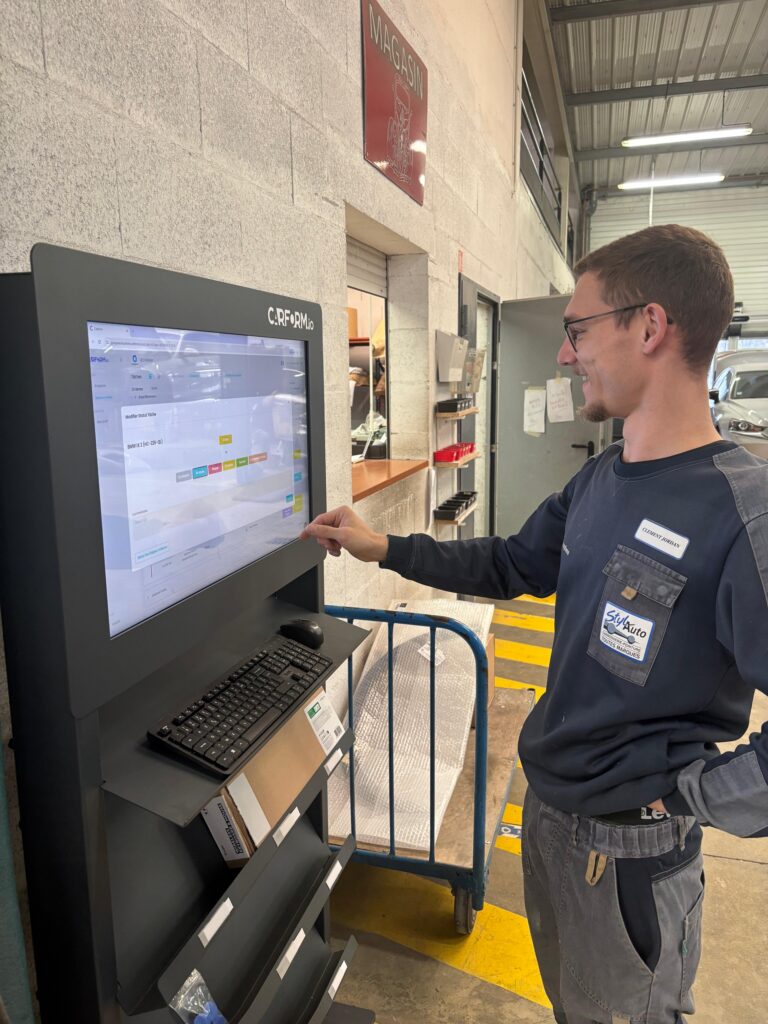 32″ kiosk
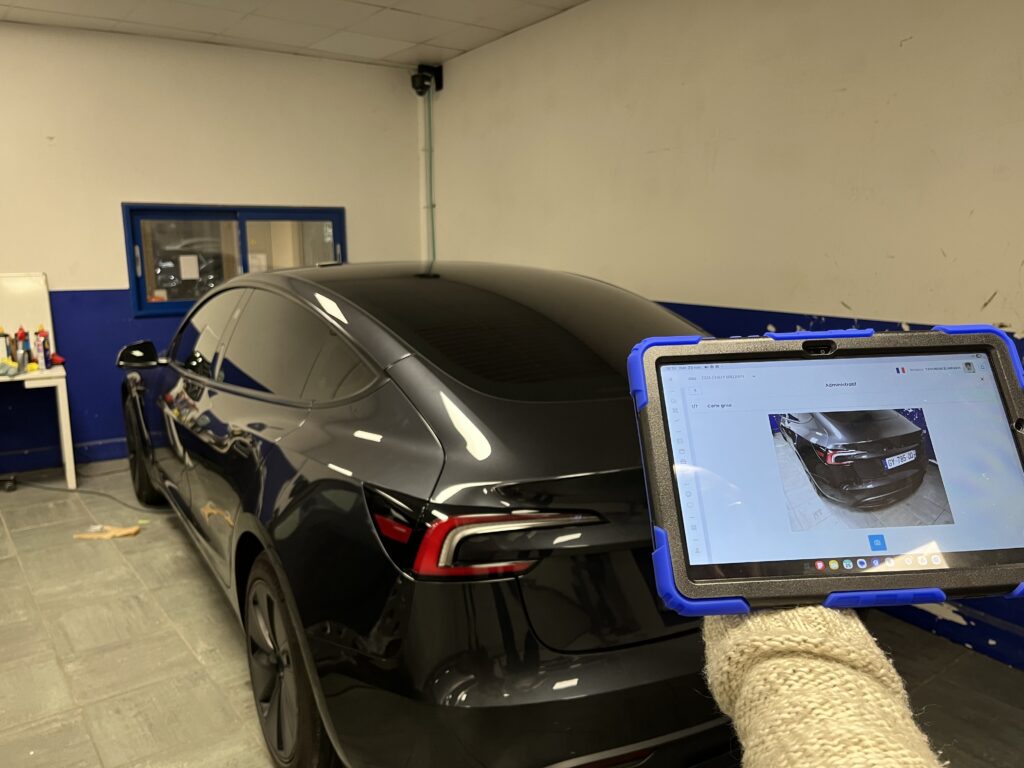 11″ tablet
A dedicated contact sets up Carform with you
Nothing to install: Carform runs straight in your browser. Your team is trained and supported until you are up and running.
Carform integrates with your workshop tools
Every feature builds on your existing software: information flows from one tool to the next, with no double data entry.
Insurance (France)
- DARVA
- CapsAuto
- Assercar
Estimating
- Audatex
- DAT
- Qapter
- GT Motive
- Groupe Lacour
DMS
- Nextlane
- DCSnet NEO
- Cilea Mastercar
- Groupe Lacour
Invoicing
- Pennylane
- Sage X3
- SAP
Paint
- Axalta
- BASF
- PPG
Assessor portals
- BCA Expertise
- IDEA
- Vroom
- Ixperience
- Experts Groupe
- MonAuto&Cie
- Kinitia
- Exauto
The same features, configured for your business
Bodyshop
Insurance claims, assessment, estimating and scheduling, from booking to vehicle handover.
See the page >Auto repair and maintenance
Online booking, job scheduling and real-time tracking.
See the page >Used vehicle reconditioning
Tracking of preparation steps and reconditioning lead times.
See the page >Work providers
Managing the repairer network, damage files and the fleet.
See the page >What these features change in their workshop

“Now we have Carform, everything is recorded on the computer. It makes finding file numbers much easier.”

Used vehicle reconditioning at its Béziers and Montpellier sites, tracked in real time in Carform.

An independent bodyshop in the Autoneo network that modernised its workshop management with Carform.
All these features, adapted to your workshop
Show us how you work today: we will show you what Carform automates, file by file.
Request a demo